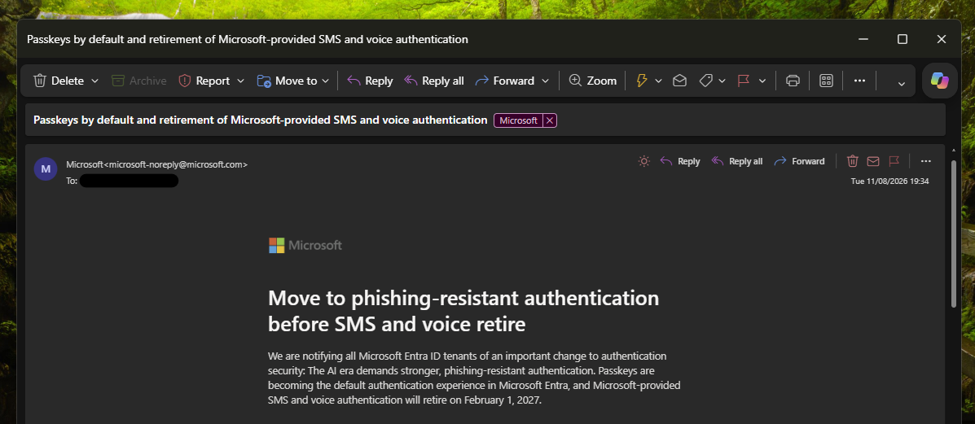
Microsoft has begun emailing administrators of Microsoft Entra ID tenants about the retirement of SMS (text messaging) and voice authentication on 1 February 2027. The email explains the upcoming changes and how users will be notified. The first phase of the rollout begins in September 2026.
What is SMS and voice authentication?
SMS and voice authentication are methods of verifying your identity during sign-in. After entering your password, you receive either a text message containing a verification code or an automated phone call that reads the code to you. You then enter the code to complete the sign-in process.
When Microsoft introduced two-step verification for Microsoft accounts in 2013, SMS and voice calls were among the most common methods available to consumer users. They provided an additional layer of security by requiring access to a trusted phone number, making it more difficult for someone to gain access to an account using only a stolen password.
Over the years, authentication technology has evolved significantly. Authenticator applications, such as Microsoft Authenticator, can generate time-based one-time passcodes (TOTP) locally on a device without relying on the mobile phone network. More recently, passwordless technologies such as passkeys have emerged, providing stronger protection against phishing and account compromise.
As a result, Microsoft and other technology companies are increasingly investing in phishing-resistant authentication methods and moving away from traditional SMS and voice-based verification.
It is important to remember that, at the time, SMS and voice verification represented a significant improvement over relying solely on a password. However, cyber threats have evolved considerably over the past decade. Techniques such as phishing, SIM swapping, and social engineering attacks have shown that SMS-based authentication is no longer as secure as newer alternatives such as authenticator apps and passkeys.
While SMS and voice authentication remain more secure than using only a password, they are considered vulnerable to modern attack techniques. This has led Microsoft and other technology companies to invest in phishing-resistant authentication methods that provide stronger protection for users and organisations.
What is the timeline for this change?
Microsoft is providing organisations with plenty of time to prepare for these changes, allowing administrators to plan user communications, training, and any additional hardware requirements, such as security keys.
September 2026
Starting in September 2026, users who are currently enabled for SMS or voice authentication will automatically be enabled for passkeys. Unless an administrator changes this behaviour, users will be prompted to register a passkey the next time they sign in and complete a multi-factor authentication (MFA) request.
Users can choose to dismiss the prompt, and administrators can move users out of the passkey registration policy before 1 September 2026 if required.
February 2027
From 1 February 2027, Microsoft-provided SMS and voice authentication will be retired for most Microsoft Entra ID users. This means users will no longer be able to rely on Microsoft’s SMS or voice services for MFA verification.
Users who only have SMS or voice configured as their MFA method may be required to register a passkey before they can continue accessing their account. Organisations that still require SMS or voice verification will need to configure a supported third-party telephony provider through Microsoft’s telephone provider model.
For organisations that have not prepared before this date, there is a risk of sign-in disruption for users who continue to rely on SMS or voice authentication.
What do users need to do?
The best thing users can do is review their existing authentication methods and ensure they have at least one modern authentication method configured on their work or school account. Users can manage their security information through the: My Sign-Ins | Security Info | Microsoft.com
Depending on your organisation’s policies, you may be able to register one or more of the following authentication methods:
Microsoft Authenticator,
Passkeys,
FIDO2 security keys (hardware tokens),
Windows Hello for Business,
For many users, Microsoft Authenticator or a passkey will be the simplest replacement for SMS and voice verification.
If you currently rely on SMS or voice verification, it is worth checking your account now rather than waiting until the retirement date. This will help ensure you continue to have access to your account when the changes take effect.
If you are an IT administrator, Microsoft has published guidance covering the SMS and voice authentication retirement, including recommended migration strategies, passkey deployment guidance, and information about alternative telephony providers for organisations that still require SMS or voice-based verification.
Yes, although the changes are being implemented separately from the Microsoft Entra ID retirement announced for work and school accounts.
Microsoft has already published a support article informing users that SMS codes are no longer available for certain multi-factor authentication (MFA) and account recovery scenarios for personal Microsoft accounts. In the article, Microsoft explains that more secure authentication methods are now available and recommends that users move to modern alternatives such as passkeys and authenticator apps.
The support article also provides guidance on the authentication and recovery options that remain available for personal Microsoft accounts, helping users prepare for a future that relies less on SMS-based verification.
In this article, Microsoft has stated that they have changed this as there are more secure methods for authentication users can use for their Microsoft accounts. This article guides users through the available options they can use for their accounts.
Credential stuffing attacks are becoming increasingly common. More people are reporting constant authentication notifications, one after another. Even when they deny them, the prompts keep coming. It feels relentless. For many, it becomes a flood of MFA requests that’s both disruptive and alarming. This isn’t limited to home users; attackers are targeting business accounts just as aggressively.
What is credential stuffing
Credential stuffing is an automated attack where bots use stolen username and password pairs, usually obtained from unrelated data breaches, to try to sign in to a user’s account without their consent. Attackers simply take these leaked credentials and test them across multiple services, hoping the victim reused the same password elsewhere.
How the attacker obtained the credentials varies depending on the service, but the pattern is the same, the bot attempts repeated logins using known combinations. When the password is correct, but the account is protected by two‑factor authentication, the attacker can’t get in, but the login attempt still triggers Multi-Factor Authentication (MFA) prompts for the legitimate user.
This attack is a variation of a brute force style approach, but instead of guessing random password combinations, the attacker uses real username and password pairs that have already been leaked from other sites or services. The bot simply cycles through these known combinations and tries them against the target account. Attackers rely on this method because they know many people reuse the same password across multiple platforms, so a breach on one site can quickly become an attack vector on another.
How does the attacker get the data
Attackers obtain usernames, passwords, and other personal information primarily through data breaches. A data breach occurs when an unauthorised individual gains access to a company’s database or system that stores customer information. Once inside, the attacker can extract large volumes of data, often millions of records at a time.
This stolen data is then packaged and sold on criminal marketplaces, where other attackers buy it for their own purposes. These datasets often include email addresses, passwords, phone numbers, and sometimes financial or identity information. Once your details are exposed, they can be misused in several ways, including:
Launching targeted phishing attacks to trick you into giving away more information or money
Attempting to break into your other accounts using the same password (credential stuffing)
Using stored payment details to commit financial fraud
Creating fake profiles or accounts in your name to carry out further criminal activity
This is a huge criminal industry that governments, law‑enforcement agencies, and technology companies are constantly trying to combat. But as technology evolves, so do the attackers’ methods. Once your data has been exposed in a breach and circulated online, it becomes almost impossible to remove. Copies of the same dataset are repeatedly shared, resold, merged with other leaks, and redistributed across criminal forums. Even if one marketplace is taken down, the data continues to spread among other cybercriminals, and new marketplaces quickly appear to replace the old ones.
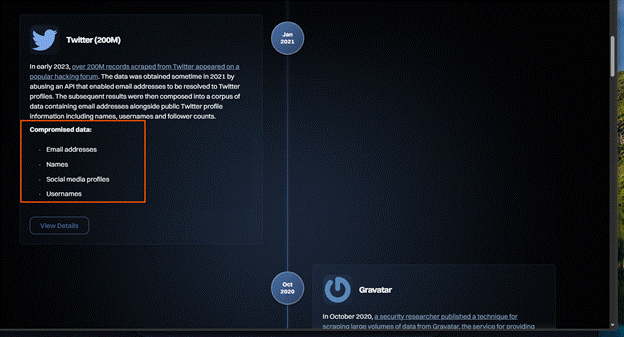
This is a free service that allows you to check if your email address was leaked in a data breach. It will provide details on what data breach it was leaked in and what data was leaked. This information is presented in a timeline starting with the latest and working its way back.
This is a valuable service that allows you to see what breach your information was leaked in, along with what information they have obtained.
When you click onto view details, it lists wat data was compromised and gives you a data breach overview. It also provides you with recommended actions that you can use.
How does this attack work
Credential stuffing attacks rely entirely on automation. Attackers take large lists of stolen usernames and passwords, usually obtained from previous data breaches, and feed them into a bot. The bot also has a target list, which is a catalogue of websites and services it should attempt to sign into. These typically include major email providers, social media platforms, shopping sites, banks, gaming services, cloud platforms, and other popular websites with login pages. Because these are widely used services, there’s a higher chance the victim has an account there. Target lists often contain hundreds of sites, and the bot simply cycles through them automatically.
Once the bot has your details, it begins testing your email and password combination across each site on the list. If a site responds with something equivalent to “this account doesn’t exist”, the bot drops that username for that site and moves on. Over time, the bot naturally filters out the sites where you don’t have an account, leaving only the ones where your username is valid.
For the sites where your account does exist, the bot then tests the passwords it has for you. If the password is incorrect, it moves on to the next one in its list. If none of the password’s work, the bot simply abandons that username for that site and moves on to the next victim in its dataset. It doesn’t waste time guessing, that would be brute force, not credential stuffing.
However, if the password does match, the bot immediately escalates its attack. Even though it cannot get into the account without multi‑factor authentication (MFA), the login attempt still triggers an MFA prompt on the real user’s device. At this point, the bot repeatedly attempts to sign in using the same valid credentials, causing a flood of MFA notifications. This is the moment users suddenly receive dozens of prompts and often panic, believing their account has already been hacked.
Once the bot discovers a valid username and password, the attacker’s goal becomes very simple, get you to approve just one MFA request. They know they can’t get into your account without that approval, so they rely on overwhelming you with constant notifications. The attacker is hoping you will eventually tap “Approve” out of frustration, confusion, or the belief that the prompt is legitimate. If you approve even once, the attacker’s device receives a valid authentication token, allowing them to sign in as you, often without needing your password or MFA again for a long period of time.
How the attacker’s bot behaves (from a programming perspective)
This section is for educational use only. It explains how the attack works so you can recognise it and protect yourself, not so anyone can recreate it.
The following pseudocode shows a simplified version of how a credential stuffing bot typically operates. It isn’t real code, just an outline of the logic these automated attacks follow.
while bot_is_running:
for each credential in combo_list:
# Stolen email + password pair from the breach dataset
email = credential.email
password = credential.password
# Loop through the list of websites the attacker wants to test
for each site in target_list:
response = attempt_login(site, email, password)
# Skip this site if the account doesn't exist here
if response == ACCOUNT_NOT_FOUND:
continue
# Skip to the next password if this one is incorrect
if response == PASSWORD_INCORRECT:
continue
# Trigger MFA fatigue if the password is correct but MFA blocks access
if response == MFA_REQUIRED:
spam_mfa(site, email, password)
continue
# If login succeeds, the attacker now has access to the account
if response == LOGIN_SUCCESS:
harvest_account(site, email)
continue
This isn’t an Artificial Intelligence (AI) system making decisions. It’s just a simple automated program. It loops through stolen data, follows basic “if this, then that” logic, and keeps running until it finds a password that works. There’s no thinking involved, only automation.
The attacker first imports the stolen user data into their program, along with a list of websites the bot should test. These are stored in arrays, which allow large lists of information to be grouped under a single variable. You can think of an array like a box full of items the program can pick from one by one.
Once the program starts running, it immediately enters a for each loop that cycles through every stolen credential in the list. Inside this loop, the bot uses a series of conditional statements to decide what to do next based on the website’s response.
The first conditional statement checks whether the email address exists on the website’s database. If the user doesn’t have an account there, the site returns an “account not found” error. The bot reads this response and simply moves on to the next site in the target list. It doesn’t retry or guess, it just skips ahead.
The next conditional statement checks whether the password is incorrect. If it is, the bot moves on to the next password it has for that email address. It keeps looping through the passwords in the dataset until it either finds a match or runs out of options.
The next conditional statement checks whether MFA has been triggered. If it has, the bot now knows the email and password combination is correct. At this point, it calls another function that repeatedly attempts to log in using the same credentials, which triggers a flood of MFA prompts on the victim’s phone. The attacker is hoping the user will eventually tap “Approve” by mistake.
The final conditional statement checks whether the login was successful. If it is, the bot now knows it has valid credentials for that account. It stores this information in a new array so the attacker can use it later, for example, to take over the account, steal data, or sell the credentials to other criminals. The bot then moves onto the next target.
In simple terms, the bot is just following a set of “if this happens, do that” rules, looping through stolen data until it finds a combination that works. Attackers often build these bots as simple Python scripts because Python makes automation easy and has libraries for handling web requests.
What happens if the attacker gains access to the account
During an MFA‑fatigue attack, many victims don’t realise they’ve granted access. When dozens of prompts appear, people often assume it’s a glitch or a legitimate request from one of their devices. Some tap “Approve” just to stop the notifications. But that single approval gives the attacker a valid authentication token on their own device, allowing them to sign in as you without needing your password or MFA again.
Once the attacker gains access to your account, they may do one or more of the following:
Replace your security details with theirs and hijack your account – They add their own email, phone number, or authenticator app, then remove yours. This locks you out completely and gives them long‑term control.
Export your personal information – This can include bank details, saved cards, messages, photos, documents, and anything stored in the account. This data can be used for fraud or identity theft.
Use your account to send phishing emails – Attackers often send malicious emails from a trusted account because recipients are more likely to open them. This spreads the attack to your contacts.
Lock you out and demand payment to get your account back – Some attackers hold accounts hostage, especially gaming, email, or social media accounts, and demand money for access.
Delete your files or threaten to publish them – Attackers may wipe your data or use sensitive information to blackmail you, threatening to leak it unless you pay.
Sell your personal information to other cybercriminals – Stolen data is valuable. Attackers often package and sell it on criminal marketplaces for others to exploit.
Sell your valid login credentials – If your account has value (such: as gaming purchases, subscriptions, or stored payment methods) attackers may sell the login details to someone else.
How to reduce or stop this attack from happening
When you start receiving unexpected Microsoft Authenticator prompts, the first thing you should do is deny every request. Never approve an MFA prompt you didn’t initiate.
The first thing to do is change your password to something completely different from anything you’ve used before.
While changing your password won’t stop the bot from continuing to try signing in, it does prevent the attacker from logging in manually if they already know your old password.
Keep Multifactor Authentication enabled & check security information
Do not turn off MFA. It is the only thing preventing the attacker from getting in.
While on the same page, check that your security information is up to date. Remove any old or unused methods such as:
old email addresses
old phone numbers
old security keys
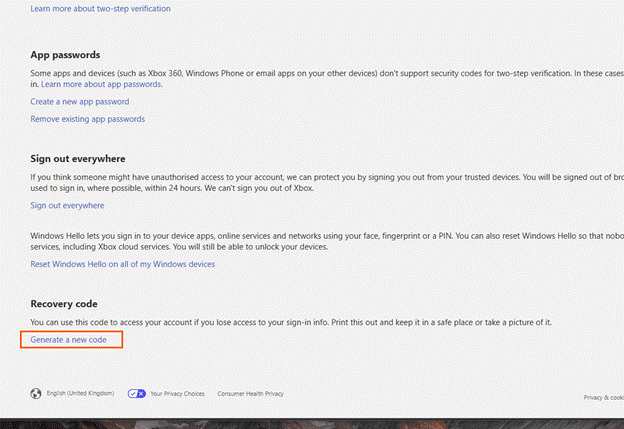
Generate a new Microsoft account recovery code (personal Microsoft accounts)
On a personal Microsoft account, you have the option to generate a recovery code to use for your account to use if you no longer have access to your security information and recovery methods.
On the security page, please scroll down to the bottom of the page.
Once at the bottom, please select “Generate a new code”
You will want to keep this in a safe place. If you do get hacked, you can use this code to recover your Microsoft account. Once you generate a new code, the previous code will no longer work.
Changing the primary alias for the Microsoft account
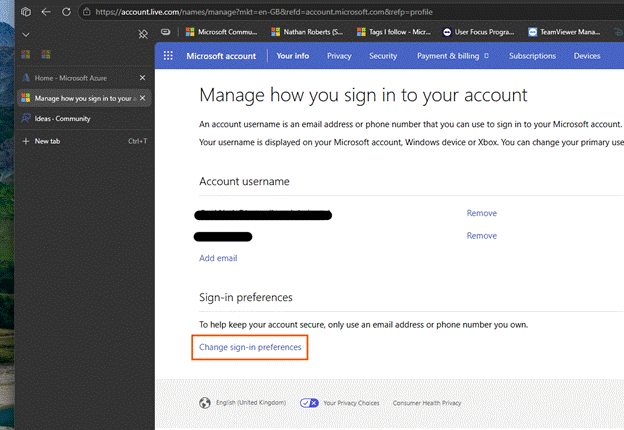
One effective way to stop the MFA spam is to change your primary alias which is the email address you use to sign in.
This works because the automated bot continues trying the old email address. When the bot attempts to sign in, Microsoft returns an error saying the account doesn’t exist. The bot then drops your email and moves on to the next target.
Changing your primary alias does not delete your mailbox or emails. It only changes the address you use to sign in.
Once you have signed into your account, you can add an email address to use when signing into your Microsoft account. You can then click onto the link to change sign in preferences.
Then select the new email you have added and de-select the previous email. Do not remove the email though, leave it on your account.
Preventing this attack from starting
A common question people ask is:
“Why can’t you just stop these attacks from happening in the first place”.
Unfortunately, in the digital world we live in today, our data is stored online across countless services. We use multiple websites every day for work, communication, entertainment, and shopping. While companies work tirelessly to prevent these attacks, and there is always more that can be done, we will never eliminate them completely.
Cyber criminals constantly look for new ways to bypass protections. As technology improves, so do their methods. We’ve already seen phishing attacks become more sophisticated, and new account takeover techniques appear regularly. The only way to stay ahead is to keep informed about the latest threats and understand how to protect your accounts.
The NCSC is a UK government organisation that publishes news, alerts, and statistics about cyber security. Keeping up with their updates helps you understand emerging threats and think proactively about your own account security.
The more we educate ourselves on the different methods we have for keeping our accounts safe, the more we can reduce our likelihood of being subjected to attacks.
Phishing isn’t a niche cybercrime anymore; it’s a daily flood. An estimated 3.4 billion phishing emails are sent every day (According to aggregated industry data from Keepnet/VIPRE (2026)), targeting everyone from large organisations to everyday users. These messages are crafted to look legitimate, often mimicking trusted brands or colleagues, with the goal of tricking someone into clicking a link or revealing sensitive information. In this post, I’ll walk you through what phishing looks like in the real world and how to recognise the red flags before it’s too late.
What is a phishing?
Phishing is a common technique used by attackers and is a form of social engineering. It involves sending emails, often in bulk, designed to trick users into revealing personal information. This might happen by replying directly to the email or by clicking links that lead to fake websites created to harvest sensitive details such as login credentials, bank information, or personal data.
These emails often look genuine and may appear to come from trusted organisations such as Microsoft, Google, Amazon, or your bank. But it doesn’t stop there. Attackers may also pose as hackers claiming to have compromising information about you, hoping fear or urgency will push you into responding to their demands.
Depending on the attacker’s goal, phishing emails may also contain malware or viruses. In some cases, simply clicking a link or opening an attachment can trigger malicious software to install in the background without the user realising.
How does phishing work
The term phishing comes from the word fishing and the comparison is intentional. When fishing, you cast a line with bait, hoping a fish will bite. Once it does, the fish is caught, and the person fishing reels it in.
Phishing attacks work the same way. Attackers send the same email to thousands, sometimes millions, of people at once. This is their ‘bait’. They only need a small number of recipients to click a link or open an attachment for the attack to succeed.
Once you click the link and enter your details on the fake site, the attacker captures that information and stores it in a database they control. With your credentials, they can access your account without your knowledge.
From there, several things can happen:
They may lock you out of your own account by changing password and security settings
If you’ve entered bank or payment information, they may attempt to make purchases or withdraw funds
They may sell your details to other criminals online, where stolen data is traded and reused in further attacks
How do they get your email address?
This is often a question I get asked when helping people who have fallen for these attacks.
Attackers will not usually guess your email address or get AI to guess email combinations. This takes time from them and is not guaranteed to go to an actual person. Instead, they will use email addresses that have already been exposed through data breaches.
Web developers and businesses have a responsibility to secure the data they collect and store, whether they collect this data in person or online through their website. When they are storing this data in person or online, they must ensure it is secure. When a website or service is compromised, attackers can extract personal information such as:
Email addresses
Usernames
Passwords
Any other information stored on their systems
Phishing is one of the most common ways that hackers will use to breach these systems and extract this data – often without the person even knowing about it until it is too late.
Once data has been stolen, it is extracted and placed onto a database where other cybercriminals can use this data at a cost. These databases are huge with millions of email addresses that have been obtained through sources such as:
Data breaches – when a company you’ve signed up with is hacked
Leaked marketing lists – poorly secured mailing lists being stolen
Credential dumps – collections of stolen usernames and passwords shared online
Scraping public sites – attackers collecting emails from social media, forums, or websites
Old accounts you’ve forgotten about – even inactive accounts can be breached
Once your email address is on these databases, it is circulated to other attackers. Removing your email address, or personal information, from these databases can be nearly impossible due to how many people have it and how frequently it is shared.
Who do phishing attacks target?
Cybercriminals don’t just send phishing attacks to individuals. They send phishing attacks to organisations. Everyone is targeted.
Business users
Business users will receive a lot of phishing emails from attackers, especially when their email addresses are publicly listed on the business website. Having email addresses listed on the website makes them a target as they have their job description and their email address that they can use to tailor their phishing attack to them and their role.
Business employees
The average business employee are common targets, even if they have no administrator access to the system or they don’t handle sensitive data. Attackers will see them as a valuable entry point into the system because these individuals will often be overlooked because of their role or level of access. Attackers will see this as a golden opportunity as a compromised account can act as a ‘back door’ into the organisation’s system.
This can be especially risky when:
Employees haven’t received training around phishing attacks
Their mailbox accepts emails from outside the organisation
They are unaware of the common red flags with phishing emails
They are not confidant in reporting suspicious emails
Even if they are an average employee with no administrator access to critical systems, they are a good target as it allows them access through a ‘back door’ into the company’s systems that they can exploit.
Attackers will often craft their emails to look like they are genuine emails from, but not limited to:
Suppliers
Customers
Colleagues
Training providers offering free or paid training courses for their role
A service alert from ‘Microsoft’ or ‘Google’
The more these emails look genuine, more likely it is for someone to fall for it.
IT Administrators & developers
Attackers will target IT administrators and developers because of the high level of access they have across systems. However, they will know that these individuals are generally more aware of phishing tactics, so the attacks aimed at them tend to be more sophisticated.
Examples of phishing attacks they can face are, but not limited to:
Service alert from ‘Microsoft’, ‘Google’, ‘Web hosting company’
Marketing emails from other service providers,
Messages impersonating colleagues or internal systems
If an attacker is to successfully compromise an administrator or developer account, they will gain access to critical systems, sensitive data as well as the ability to cause significant disruption to the company – from data extraction to system wide shutdowns.
So, as you can see, businesses are targeted by phishing attacks – not just your IT administrators and developers, but everyone within the organisation. When you step into the mind of an attacker, you realise the average employee is the better target. Even though they don’t have access to critical systems or may not have access to user data their account and device can still provide a valuable way in for the attacker.
When the WannaCry malware crippled the NHS. It demonstrated that just one small vulnerability on a network can have a huge impact throughout the entire organisation. Although the malware wasn’t delivered through an email, investigations later revealed that it exploited a flaw in outdated operating systems on the network which allowed it to jump from computer to computer, encrypting files as it spread.
This is why it is vital that everyone has training on phishing and is aware of current phishing tactics. People should know how to protect themselves from this attack along with other cybersecurity risks they can be exposed to when using technology.
Individual users
Individual users are also heavily targeted by phishing emails, especially when their email addresses have been leaked in previous data breaches. The type of phishing emails you receive will often depend on the kind of data that was exposed in a breach- for example, whether attackers just obtained your email address or other information such as your name, address, age, phone number or login details.
Unlike phishing attacks aimed at businesses, these emails are usually less personalised. Attackers often rely on broad, generic messages designed to catch as many people as possible with one simple goal- to catch as many people as possible with their bait.
Average user
The average user is the most common targets for phishing attacks because that most people don’t receive formal cybersecurity training. Attackers know this and use this to their advantage. They understand that a typical home user may not recognise the subtle red flags that make phishing emails stand out. They also know that most users:
Reuse passwords across multiple accounts
Rely on a single email address for everything they do online (e.g. shopping, banking, social media sites)
Act quickly when an email triggers fear, urgency or curiosity
May not have multi-factor authentication enabled or understand what this is
May not be aware of tools to help them keep their accounts protected online
May not keep their devices fully updated
Because of this, attackers will typically send broad, generic, phishing emails designed to catch as many people as possible. Examples of the types of phishing emails are, but not limited to:
Delivery scams
Bank alerts
Subscription renewals
Fake invoices from online shops
Fake emails implying your account has been compromised
These emails are deliberately structured to provoke an emotional reaction- usually fear or urgency. Attackers know that if they can get your heart racing, you’re more likely to act without thinking. In that moment, it becomes easy to hand over personal details or click a malicious link without noticing the red flags, compromising your account and device in a matter of seconds.
Children
Children and young people are targeted because of how vulnerable they are online. Even though they spend more time online, they are often more trusting then adults. Attackers exploit this- they know that children:
May not understand what phishing is
Are more trusting of messages that look ‘official’
May click onto links without thinking about what they are doing
May not recognise fake login pages
Often use shared family devices
Often use the same password for all their accounts
May not understand what they are handing over and how this can make them vulnerable
Armed with this knowledge, attackers send phishing emails specifically designed to appeal to children. The common theme includes, but not limited to:
Fake gaming rewards or ‘free coins/robux’
Fake login prompts for platforms (e.g. Xbox, Roblox, Fortnite, Minecraft)
Direct them to ‘official’ servers on Discord for games (e.g. Official Minecraft server) that they need to sign up for using their Microsoft account
Fake ‘parental permission required’ messages
Fake emails from ‘school e-learning’ platforms
Attackers know that by gearing the emails to look like genuine emails from well-known games and services, children are far more likely to fall for them. They understand that children may share personal information without realising the consequences- potentially putting themselves and families at risk in the future.
Elderly & vulnerable people
Elderly & vulnerable people are among the most heavily targeted groups. Attackers know that people in this group are generally:
Not confident with computers and technology
Unfamiliar with modern scams and phishing strategies
More trusting in authority
Prone to act on fear-based messaging
Attackers know that elderly and vulnerable people find it difficult to distinguish between genuine emails and fake ones. They understand that this group are less likely to check for red flags such as suspicious sender addresses, unusual links or poor grammar. This allows attackers to send emails such as:
Bank account warnings,
Medical or prescription notifications
TV licence reminders
Utility bill issues – The pay now notifications
HMRC tax refunds or penalties
Threats to close your account
Tech support alerts claiming their device or account has been compromised or infected with a virus/malware
The emails they send are designed in a way to create fear or urgency. This pushes the user to act quickly without verifying the message or asking questions around why they received this email. Attackers rely on the fact that elderly and vulnerable people are not your typical computer user. This is why attackers will focus on images, logos and the authoritative language used within the email, giving the email a genuine look which makes the scam appear legitimate.
How to spot phishing attempts – the red flags to look out for
When supporting people in person, on the Microsoft Q&A Community and other online communities. I often find that a wide range of people have fallen victim to phishing attacks. Years ago, phishing emails were much easier to spot – the spelling mistakes stood out, grammar was poor and the formatting looked suspicious. However, modern phishing attacks have become far more sophisticated and harder to detect. People who were once confident they wouldn’t fall for a scam are now being caught out by emails that look almost identical to genuine emails.
Because of this, we need to be cautious on how we approach emails that land in our inbox. Attackers rely on us acting quickly and emotionally as this results in us to act without thinking. To combat this, we need to slow down.
Read the entire email first
At this stage, you have most likely started reading the subject line or the first couple of sentences within the emails. Your heart might be frantically racing- you’ve got a hundred questions racing through your head- you probably thinking ‘great how am I going to pay the next bill’, ‘what have I purchased’, ‘what’s going to happen to my account’ or ‘this is amazing. Lifetime opportunity. Where do I sign up!’.
Don’t stop there. This is what they want you to do.
This is exactly the emotional response that makes you vulnerable and turns you into their next victim.
Instead, keep reading the email they have sent you. Once you have read it, take a deep breath and walk away from it for a few minutes if needed. Then come back to the email again with a calmer mindset. When you come back and read the email again, you are starting to unpick it and identifying the red flags that you missed previously.
The email address
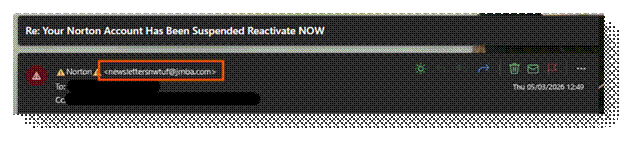
The first thing I check is the email address the email has come from. If their full address doesn’t show, hover your mouse cursor over the sender’s name. This will reveal the actual email address. This will make the email address show. Once you see the full email address being used, pay close attention to the domain they are using.
In the example above, you can see the email claims to be from Norton, warning me that my account has been suspended because I haven’t paid my latest bill. If this email was genuine, you would expect that the email would come from ‘@norton.com’. Instead, this email is from ‘@jmba.com’ which has nothing to do with Norton. This alone is a major red flag.
Some phishing emails make this obvious with completely unrelated domains. Others are far more cunning. I’ve seen phishing emails pretending to be from Microsoft using a domain like ‘@mlcrosoft.com’. If you look closely, the ‘i’ in Microsoft has been changed to ‘l’. At a quick glance, this can be missed. Especially by computer savvy people when they read this quickly. Now if you were reacting emotionally, you would have thought this was genuine.
The use of emojis in the email?
The next thing to check is the use of emojis in the subject and the sender’s display name. Most phishing emails I have received recently have started to include emojis next to the sender’s name to grab your attention and trigger an emotional response. Some examples of these are:
⚠️ – Warning triangle
‼️ – Double exclamation marks
🚨 – Alert
🔒- Padlock
These symbols are chosen deliberately because they create a sense of urgency or danger when you first glance at them in your inbox.
Legitimate companies do not use emojis within the sender’s name. They use their official company name or the name of the department contacting you. The message will be clear and professional.
So, if you notice emojis in the sender’s name, the chances are you are looking at a phishing email. This is another red flag within phishing emails.
Are you expecting this email?
Now you have read the email and have come back with a clear head. You have looked at the email address but are still unsure. The next to ask yourself is:
Am I expecting this email?
When I received the email from ‘Norton’ informing me that my account has been suspended due to me not paying for my subscription, my immediate reaction was ‘I don’t use Norton’.
The answer to that simple, but effective, question told me that this was a phishing attempt without needing to look further at the email. If I don’t use their services, I am not expecting emails from Norton about their services, or about my account been suspended.
If the email address is unexpected. There is a high chance that it a phishing email. Companies won’t email you out of nowhere. Companies will only email you if you are:
A customer
Have signed up for their services.
Have opted in to receive communication about their services
I don’t use Norton and have never signed up for their services. They won’t have my email address. So how could they send me account related emails for their service?
They can’t.
That alone is a major red flag. A simple, but powerful, question can be all you need to keep yourself safe online and in person.
The language they use within the subject and body of the email
If you are still unsure about the email and you have checked whether you were expecting the email. The next thing you should look at is the language used in the subject line and the body of the message.
Phishing emails will often rely on emotional manipulation. Attackers want you to react quickly- not think logically. To achieve this, they use language designed to trigger an emotional response such as fear, urgency, curiosity or excitement. This is why they often use phrases like:
‘Your account has been suspended’
‘Payment failed – Update payment details now’
‘Unusual activity detected’
‘Parcel can’t be delivered’
‘Final warning …. ‘
‘Congratulations! You’ve won…’
These phrases have been purposely crafted to provoke an emotional reaction. Attackers know that when your emotions take over, they have a bigger chance of success. When you’re panicking or rushing, you’re far less likely to notice any red flags in the email.
Subject lines are usually short and direct because it grabs your attention and triggers that emotional response, they are after. The phrases above allow them to do this. Hooking you into the email, all while making your emotions skyrocket ready for the main part of the message.
When you do start to read the body of the email. Phishing emails will continue the emotional pressure by using:
Excessive use of urgent language (e.g. ‘react NOW!’, ‘Urgent action required’, ‘Take action’)
Threatening phrases (e.g. ‘Your account will be closed today’, ‘Your data will be lost forever after today’, ‘You have 24 hours to respond before I share your data’)
Poor grammar or unnatural phrasing
Generic greetings (e.g. ‘Dear customer’, ‘Hello user’, ‘Hello followed with the first part of your email address)
Inconsistent tone
While the subject line is the initial trigger for an emotional response, the body of the email will keep the pressure going with the language they use. This is why, when you look at phishing emails, they use threatening phrases they know will keep your emotions high and your rational thinking low.
Once you have a calmer mindset, these clues stand out more. When you compare them to genuine emails you receive from companies like Microsoft, your bank, or other services. You notice those messages are consistent with their tone, the language is professional, and they don’t threaten you with immediate consequences. Instead, they use phrases like, ‘Please update your payment information on your account.
Genuine companies want to notify you that something is wrong with your account or payment method, not frighten you. They don’t expect a reaction instantly. Their systems are designed to send reminders long before they act on the account because they want to keep you as a customer.
This is a big difference between a genuine company and an attacker sending a phishing email. Companies want you to stay with them and maintain your trust. Attackers want an instant reaction: act now, think later.
Links in the email
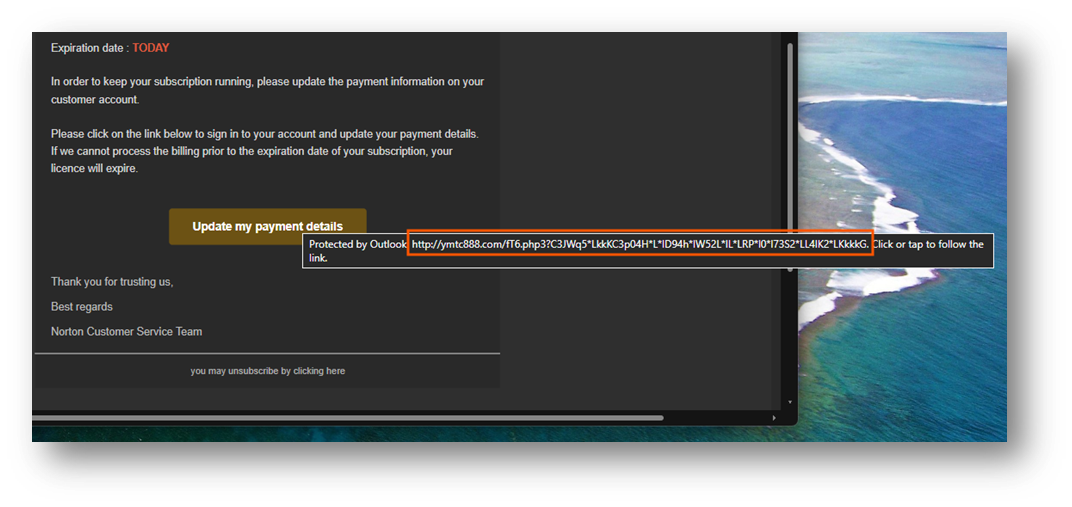
The next thing you should look out for is the links within the email. Not just the link text that is displayed, but the actual web address behind the link. To do this, hover your mouse curser over the link. This will reveal the actual address behind the link in a tooltip within your email client. In Outlook, this is under the link. In other email clients, this could be at the bottom of the client.
This allows you to see exactly where the link is going to direct you.
In the example above, the link looks like it is going to an official Norton page where you can update your payment information. However, when you hover over the link the tooltip shows the link directs to an unrelated website. This is a major red flag with phishing emails.
Attackers set up fake sites that mimic the real site. At first glance, you think you are signing into an official site or service. You will notice the page has the company’s logo, font style, wording and page colours are all copied to trick you into thinking you are on the official website.
What makes these pages more convincing at the first glance is the URL they choose to use. As people skim read the URL in the address bar, they use this to their advantage. This means attackers will include brand names inside the URL which help deceive unsuspecting users into the bait. Examples I have noticed in the past include:
mlcrosoft.com
support.microsoft.support.com
support.microsoft.co.uk
microsoftonlinesupport.com
These look like official URL sites but are fake. People see the company name when they skim read and see the company name and think it is legit. The key part you should focus on in the URL is the name that comes directly before the ‘.com’, ‘.co.uk’ etc… This is the domain name. When you know where the domain name is, you know where to look to find the flags.
When you look at more sophisticated phishing emails, you’ll often find shortened URLs embedded inside the message body. Attackers use these because they hide the true destination of the link, making the trick of hovering your mouse over the link redundant. The only way you can see where this link takes you is by clicking onto the link and following it through- which is what the attackers want you to do.
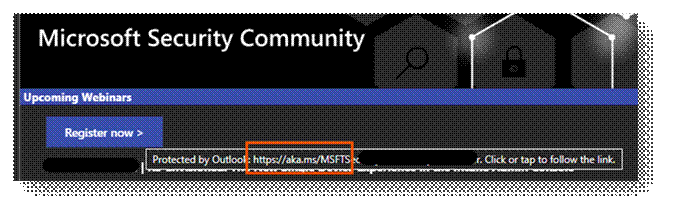
What makes this even more problematic is that legitimate companies do sometimes use shortened URLs in their emails. For example, Microsoft use the ‘aka.ms/….’ link in their emails. Especially emails such as:
Marketing emails,
Event sign-ups,
Support documentation links
In my example above, you can see the ‘aka.ms/…’ link within the email. While on emails notifying me about changes with my account, they don’t use shortened URLs. This is something to keep in mind when you receive emails with links. If the email is unexpected, asking you to act urgently, or pressure you to update payment details, then never trust the shortened URL. Treat it as a red flag.
The advice in the next section will guide you through what to do instead, even with genuine emails, to ensure you keep yourself safe.
Don’t click onto the links. Do this instead
After you have read the email, looked for the red flags and digested what it is about. I always take a step back and think
‘What is the purpose of this email?’
When you think about it. The purpose of emails is to inform you that:
Something wrong with your account
Something has been updated
There are offers in the store
There are upcoming events
What has happened recently with the product/service (newsletters)
The key word here is to inform.
It is extremely rare I will ever click onto any links within the email. Especially if the message claims there is a problem with my account, package can’t be delivered.
Instead, I open a web browser and go directly to the official website myself. This is what you should do too.
Here are some example scenarios:
Received an email telling you that your security information has been changed on your Microsoft account?
If your account is frozen, it will display a message on why and how to unfreeze your account
Why this works
Attackers rely on us clicking the links they provide without thinking about it. Sophisticated phishing attempts often mimic real messages perfectly- right down to the branding, layout, tone, everything you would expect in a genuine email.
By navigating to the official website, you remove the attacker’s biggest weapon they have, you remove the control over where the link takes you.
Doing this, protects you against:
Fake login pages
Malicious redirections to malicious sites
Shortened URLs that blindly direct you to malicious sites
Spoofed domains
Hidden tracking links
Banks were the first to push this advice- and for a good reason. Tech savvy users rarely click the links inside the email, so companies now invest heavily in showing important alerts inside your account, not just in your inbox.
Going directly to the official site is one of the strongest, most effective, defences you have. It works every time.
Phishing isn’t going away, and attackers are becoming more sophisticated — some even using AI to craft convincing messages. That’s why we need to adjust our habits and think more logically. By slowing down, staying sceptical, and always visiting official websites directly instead of clicking email links, we give ourselves one of the strongest defences available. These simple habits keep us safe online.