Microsoft 365 subscriptions now allow you to change the subscription type
Microsoft appears to have made some welcome changes to how consumer Microsoft 365 subscriptions work. Previously, if someone wanted to move from Microsoft 365 Personal to Microsoft 365 Family, they first had to turn off recurring billing or cancel the subscription entirely. Only then could they purchase the plan they wanted.
This process frustrated many users, especially because refunds for unused time were not always guaranteed. However, while helping a user on a recent Microsoft Q&A thread, I noticed that this behaviour has changed. Users can now switch their Microsoft 365 plan directly from the Subscriptions section of the Microsoft account overview page. No cancellation or waiting period required.
How to change your Microsoft 365 subscription
To change your Microsoft 365 subscription plan, please sign into your Microsoft account on the services page: Microsoft account | Subscriptions
Once you have signed into your Microsoft account, you will see all your subscriptions connected with your Microsoft account. If you navigate to your Microsoft 365 subscription, then click “Manage” on the right-hand side of the tile.
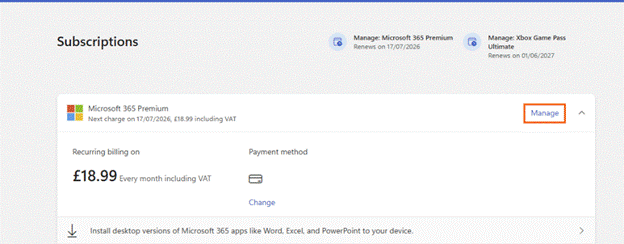
This will take you to the subscription details page where you can view your subscription details and manage the subscription. You will want to scroll down until you see “Change subscription plan”
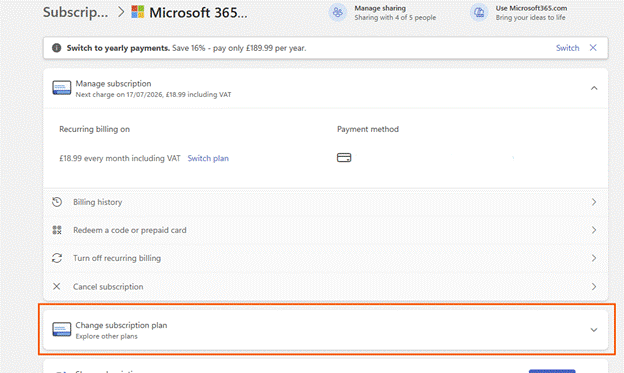
When you click onto that tile, it will show you the different plans you can choose from.
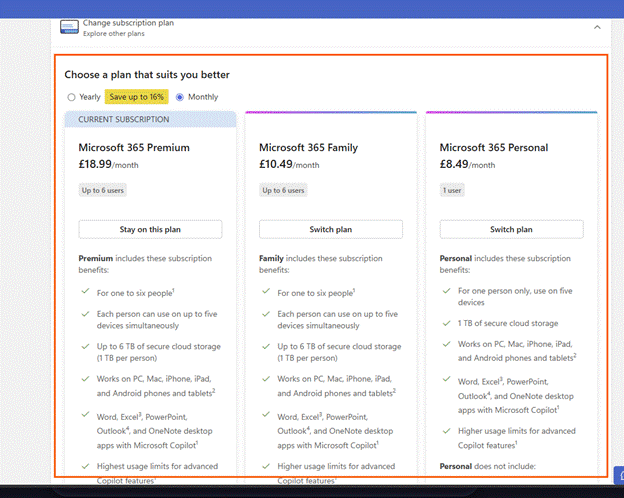
You can toggle between yearly or monthly payment. Each plan provides you with the cost per month/year and what each plan includes. You can choose which plan you wish to choose to by clicking onto “Switch plan”
From experience from switching from Microsoft 365 Family to Microsoft 365 Premium, the process is quick. You will get an email confirming your choice and payment was taken the same day for the subscription, which changed my billing date from the 27th of the month to the 17th of the month.
As I couldn’t find any announcement about this, from Microsoft, I am unsure if this is only region specific or specific to certain subscriptions. Despite this, it is a welcomed change.