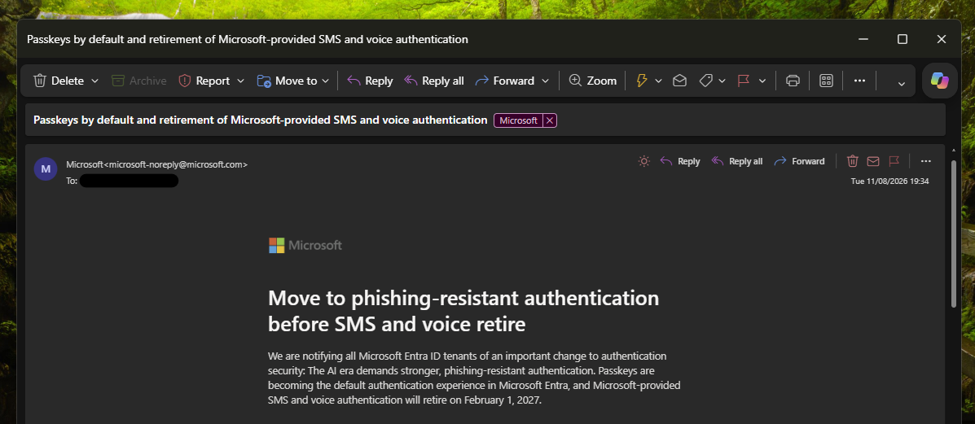
Microsoft has begun emailing administrators of Microsoft Entra ID tenants about the retirement of SMS (text messaging) and voice authentication on 1 February 2027. The email explains the upcoming changes and how users will be notified. The first phase of the rollout begins in September 2026.
What is SMS and voice authentication?
SMS and voice authentication are methods of verifying your identity during sign-in. After entering your password, you receive either a text message containing a verification code or an automated phone call that reads the code to you. You then enter the code to complete the sign-in process.
When Microsoft introduced two-step verification for Microsoft accounts in 2013, SMS and voice calls were among the most common methods available to consumer users. They provided an additional layer of security by requiring access to a trusted phone number, making it more difficult for someone to gain access to an account using only a stolen password.
Over the years, authentication technology has evolved significantly. Authenticator applications, such as Microsoft Authenticator, can generate time-based one-time passcodes (TOTP) locally on a device without relying on the mobile phone network. More recently, passwordless technologies such as passkeys have emerged, providing stronger protection against phishing and account compromise.
As a result, Microsoft and other technology companies are increasingly investing in phishing-resistant authentication methods and moving away from traditional SMS and voice-based verification.
It is important to remember that, at the time, SMS and voice verification represented a significant improvement over relying solely on a password. However, cyber threats have evolved considerably over the past decade. Techniques such as phishing, SIM swapping, and social engineering attacks have shown that SMS-based authentication is no longer as secure as newer alternatives such as authenticator apps and passkeys.
While SMS and voice authentication remain more secure than using only a password, they are considered vulnerable to modern attack techniques. This has led Microsoft and other technology companies to invest in phishing-resistant authentication methods that provide stronger protection for users and organisations.
What is the timeline for this change?
Microsoft is providing organisations with plenty of time to prepare for these changes, allowing administrators to plan user communications, training, and any additional hardware requirements, such as security keys.
September 2026
Starting in September 2026, users who are currently enabled for SMS or voice authentication will automatically be enabled for passkeys. Unless an administrator changes this behaviour, users will be prompted to register a passkey the next time they sign in and complete a multi-factor authentication (MFA) request.
Users can choose to dismiss the prompt, and administrators can move users out of the passkey registration policy before 1 September 2026 if required.
February 2027
From 1 February 2027, Microsoft-provided SMS and voice authentication will be retired for most Microsoft Entra ID users. This means users will no longer be able to rely on Microsoft’s SMS or voice services for MFA verification.
Users who only have SMS or voice configured as their MFA method may be required to register a passkey before they can continue accessing their account. Organisations that still require SMS or voice verification will need to configure a supported third-party telephony provider through Microsoft’s telephone provider model.
For organisations that have not prepared before this date, there is a risk of sign-in disruption for users who continue to rely on SMS or voice authentication.
What do users need to do?
The best thing users can do is review their existing authentication methods and ensure they have at least one modern authentication method configured on their work or school account. Users can manage their security information through the: My Sign-Ins | Security Info | Microsoft.com
Depending on your organisation’s policies, you may be able to register one or more of the following authentication methods:
- Microsoft Authenticator,
- Passkeys,
- FIDO2 security keys (hardware tokens),
- Windows Hello for Business,
For many users, Microsoft Authenticator or a passkey will be the simplest replacement for SMS and voice verification.
If you currently rely on SMS or voice verification, it is worth checking your account now rather than waiting until the retirement date. This will help ensure you continue to have access to your account when the changes take effect.
You can view an overview of the authentication methods available within Microsoft Entra ID on Microsoft’s documentation site: Microsoft Entra authentication overview – Microsoft Entra ID | Microsoft Learn
Guidance for administrators
If you are an IT administrator, Microsoft has published guidance covering the SMS and voice authentication retirement, including recommended migration strategies, passkey deployment guidance, and information about alternative telephony providers for organisations that still require SMS or voice-based verification.
Further information can be found here: Passkeys by default and retirement of Microsoft-provided SMS and voice authentication – Microsoft Entra ID | Microsoft Learn
Will this effect personal Microsoft accounts?
Yes, although the changes are being implemented separately from the Microsoft Entra ID retirement announced for work and school accounts.
Microsoft has already published a support article informing users that SMS codes are no longer available for certain multi-factor authentication (MFA) and account recovery scenarios for personal Microsoft accounts. In the article, Microsoft explains that more secure authentication methods are now available and recommends that users move to modern alternatives such as passkeys and authenticator apps.
The support article also provides guidance on the authentication and recovery options that remain available for personal Microsoft accounts, helping users prepare for a future that relies less on SMS-based verification.
Users can learn more here: Microsoft to stop sending SMS codes for personal accounts | Microsoft Support
In this article, Microsoft has stated that they have changed this as there are more secure methods for authentication users can use for their Microsoft accounts. This article guides users through the available options they can use for their accounts.